
Betwgb Nigeria mobile app
Betwgb Nigeria's mobile app puts crash games, slots, live dealer tables and sports betting on Android and iOS, built for bettors in Lagos, Abuja and Kano who place most of their bets from a phone rather than a desktop browser. The app loads faster than the mobile site on a typical 4G connection and keeps a session active for quicker access to Aviator, football odds and account balance.


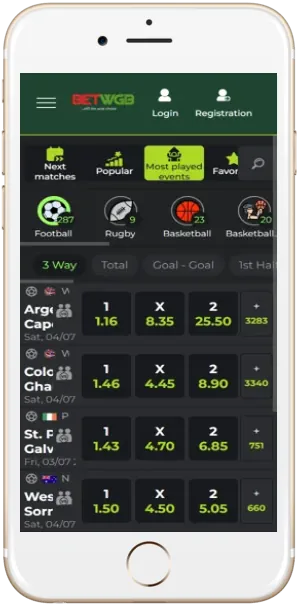
What does the Betwgb Nigeria app support?
The app runs on Android 5.0 or higher and iOS 13 or higher, and the Android package sits between 15 and 30 MB depending on the release, smaller than most banking apps used in Nigeria for comparison. It supports NGN as the default currency and English as the interface language, matching the web platform exactly rather than offering a separate feature set.
Push notifications alert a user to settled bets, deposit confirmations and new promotions, a feature the mobile browser version cannot replicate since browser tabs close and lose that connection. Biometric login through fingerprint or face unlock is available on supported devices, cutting login time to a couple of seconds compared with typing a password on the web version.
| Property | Value |
|---|---|
| Supported OS | Android 5.0+, iOS 13+ |
| Android file size | 15 to 30 MB |
| Install source | Direct APK download, App Store |
| Default currency | NGN (Naira) |
| Interface language | English |
| Biometric login | Fingerprint and face unlock supported |
| Push notifications | Bet settlement, deposits, promotions |
| Update frequency | Roughly every 4 to 6 weeks |
| Minimum Android version | 5.0 Lollipop |
| Storage required | Approximately 60 MB free space |
Installing the app on Android and iOS
Android users download the APK file directly from the Betwgb Nigeria site because the app is not listed on the Google Play Store, a restriction common across Nigerian betting apps due to Play Store gambling policy. iOS users install through the Apple App Store, which requires accepting a slightly longer verification path since Apple reviews gambling apps more closely than Android's sideload process.
A phone must allow installation from unknown sources for the Android APK to open, a setting found under security permissions rather than the default install flow. Nigerian users on limited data plans can disable background app refresh in phone settings to reduce data consumption between sessions, though this delays push notification delivery for live odds changes and settled bets until the app is reopened manually.
- 1Download the APK from the Betwgb Nigeria site or open the App Store listing on iOS
- 2Allow installation from unknown sources on Android, then confirm the download
- 3Log in with an existing phone number and password, or register a new account
- 4Enable biometric login and push notifications in the app settings menu
Games available inside the app
The app carries the same crash games, slots and live dealer tables as the desktop site, including Aviator by Spribe with a return to player near 97 percent, JetX by SmartSoft Gaming, and live tables from Evolution such as Lightning Roulette. Cashout on Aviator inside the app works with the same manual tap-to-collect mechanic as the browser version, and a stable data connection matters more here since a dropped connection during a crash round can prevent a cashout from registering in time.
Sports betting inside the app covers Nigerian Professional Football League and English Premier League fixtures with live odds that update during a match, the same markets available through the mobile browser but loading with less delay on the native app. A player switching from an older Android phone to a newer one keeps app data through account login rather than local device storage, so betting history and saved payment preferences carry over without needing a manual backup.
- Aviator (Spribe)RTP 97%, manual cashout
- JetX (SmartSoft Gaming)RTP 96%
- Lightning Roulette (Evolution)Live dealer
- Fortune Tiger (PG Soft)RTP 96.81%
App vs mobile browser performance
The app generally opens faster than the mobile browser version because it stores game assets locally instead of reloading them from a server each session, which matters most for a crash game like Aviator where timing a cashout depends on a stable connection. Battery use is slightly higher on the app due to background push notifications, though most users find the trade-off worth it for faster access to live odds.
A user comparing the two rarely reports a meaningful difference in withdrawal processing time, since both route through the same backend regardless of which interface initiated the request. Data usage is lower on the app for repeat visits because game graphics and interface elements cache locally rather than downloading fresh each time a match odds page or crash game loads.
| Feature | App | Mobile browser |
|---|---|---|
| Load speed | Faster after first install | Depends on connection each visit |
| Push notifications | Yes | Not available |
| Biometric login | Supported on compatible devices | Not available |
| Storage use | Approximately 60 MB | None |
| Update process | Manual APK or App Store update | Automatic, no action needed |
Updates, support and verification
Updates roll out roughly every 4 to 6 weeks, usually adding new slot titles or fixing odds display issues rather than changing the core interface, and Android users need to manually download the newer APK version since automatic updates are not available outside the Play Store. The app requires the same KYC documentation as the desktop site once a withdrawal request passes 50,000 NGN, so switching between app and browser does not change verification rules.
Support inside the app connects through the same live chat used on the desktop site, and a ticket about a delayed withdrawal typically gets a first response within an hour during business hours in Lagos. The app's permissions request access to storage for caching game assets and notifications for bet alerts, but it does not request contacts or camera access outside the one-time KYC document upload step. Betwgb Nigeria does not offer a tablet-optimised layout at this time, and the phone interface simply scales to fit larger screens without rearranging its layout for that format.